Monday, 12 December 2016

JUnit based on Spring MVC Test framework fails with AuthenticationCredentialsNotFoundException


After adding the second servlet and a servlet mapping to the web.xml configuration of a Spring-based web application, a JUnit test that relied on the Spring MVC Test framework started to fail.
The unit test was used to verify proper functioning of controller security layer that is based on Spring Security framework (v3.2.9 at the time).

The JUnit code (fragments):

@ContextConfiguration(loader = WebContextLoader.class, locations = {
"classpath:spring/application-context.xml",
"classpath:spring/servlet-context.xml",
"classpath:spring/application-security.xml"})
public class AuthenticationIntegrationTest extends AbstractTransactionalJUnit4SpringContextTests {
    @Autowired
    private WebApplicationContext restApplicationContext;

    @Autowired
    private FilterChainProxy springSecurityFilterChain;    

    private MockMvc mockMvc;

...

    @Before
    public void setUp() {
        mockMvc = MockMvcBuilders.webAppContextSetup(restApplicationContext)
                .addFilter(springSecurityFilterChain, "/*")
                .build();
    }

    @Test
    public void testCorrectUsernamePassword() throws Exception {
        String username = "vitali@vtesc.ca";
        String password = "password";
       
        ResultActions actions = mockMvc.perform(post("/user/register").header("Authorization", createBasicAuthenticationCredentials(username, password)));
    }
}

The test started to fail with the AuthenticationCredentialsNotFoundException as the root cause.
The change that caused the failure was introduced in order to split request security filtering into 2 distinct filter chains. The existing configuration for securing RESTful calls with Basic authentication needed to be amended to add a separate handling of requests supporting the Web user interface of the application.
That necessitated adding a second <security:http> configuration to the application-security.xml context:

<!-- REST -->
<http pattern="/rest/**" entry-point-ref="basicAuthEntryPoint" authentication-manager-ref="restAuthManager">
...
</http>

<!-- Web UI -->
<http pattern="/web/**" entry-point-ref="preAuthEntryPoint" authentication-manager-ref="webAuthManager">
        <custom-filter position="PRE_AUTH_FILTER" ref="preAuthFilter" />
        <!-- Must be disabled in order for the webAccessDeniedHandler be invoked by Spring Security -->
        <anonymous enabled="false"/>
        <access-denied-handler ref="webAccessDeniedHandler"/>
</http>

The pattern="/rest/**"  attribute was also introduced at the same time to the original <http> configuration element.

That is what ultimately caused the test to fail since the JUnit was not using Servlet path.
It is important to note that Spring MVC Test Framework runs outside of a web container and has neither dependency nor is using the web.xml.
When testing with MockMvc, it is not required to specify the context path or Servlet path when submitting requests to the controllers under test.
For example, when testing this controller:

    @RequestMapping(value = "/user/register", method = RequestMethod.POST, headers = "accept=application/json,text/*", produces = "application/json")
    @PreAuthorize("hasPermission(null, 'ROLE_USER')")
    @ResponseBody
    public RegistrationResponse register(@RequestBody(required=false) UserDeviceLog userDeviceLog) {
...
it would be sufficient to send request only specifying the mapping:
mockMvc.perform(post("/user/register").header("Authorization", createBasicAuthenticationCredentials(username, password)))

However, when access to the controllers is protected by Spring Security and the pattern is specified in the <security:http> configuration, the Spring MVC Test Framework will fully respect the processing flow failing requests that do not provide a correct Servlet path.

Resolution:
1. Specify a correct Servlet path in the request URL and also add the mapping by passing the path to the servletPath(String) method of the MockHttpServletRequestBuilder class:

mockMvc.perform(post("/rest/user/register").servletPath("/rest").header("Authorization", createBasicAuthenticationCredentials(username, password)));

2. Configure the MockMvc instance with the security filter mapping that matches the pattern specified in the application-security.xml configuration:
    @Before
    public void setUp() {
        mockMvc = MockMvcBuilders.webAppContextSetup(restApplicationContext)
                .addFilter(springSecurityFilterChain, "/rest/*")
                .build();
    }

<end>

Wednesday, 13 April 2016

Various tips on Oracle Spatial

When creating a spatial index on a table with SDO_GEOMETRY, one of the required parameters is LAYER_GTYPE.

How to find GTYPE of SDO_GEOMETRY objects in a table:

select sdo_geometry.get_gtype(geom), count(*) from map_data.zip_geom group by sdo_geometry.get_gtype(geom)
/

Monday, 11 April 2016

Configuring log4j to create a new log file at each Java program run.

For running standalone Java programs, such as jobs, that use Apache log4j logging, it is often useful to have a separate log file per each program execution.
The post covers a simple approach that can be used with a FileAppender by using a timestamp as part of the log file name injected from a system property.

Two different samples are provided. One can be used when the Java program is launched directly from a shell (manually or via a scheduler) and the other when launching it as an Ant task.

The log4j configuration is the same for both scenarios and is shown right below:

# A sample Log4j configuration demonstrating how to create a new log file 
# at each program start.
# Created:  Apr 6, 2016 by Vitali Tchalov

log4j.rootLogger=info, stdout, logfile

log4j.appender.stdout=org.apache.log4j.ConsoleAppender
log4j.appender.stdout.layout= org.apache.log4j.PatternLayout
log4j.appender.stdout.layout.ConversionPattern= %5p [%t] (%d) %c - %m%n

log4j.appender.logfile=org.apache.log4j.FileAppender
log4j.appender.logfile.File=logs/job_${log.timestamp}.log
log4j.appender.logfile.layout=org.apache.log4j.PatternLayout
log4j.appender.logfile.layout.ConversionPattern=%d [%t] %5p %c - %m%n

The configuration uses a custom system property log.timestamp to append a unique (with a second precision) suffix to the log file name.

The way the property is set depends on how the Java program is launched.

Scenario 1 - when starting a plain regular Java program by directly invoking the java executable

1. Add a system property in a static block of the main class (i.e. the launching class with the main(String[]) method) prior to referencing any Logger.

static {
    System.setProperty("log.timestamp", 
        new  SimpleDateFormat("yyyyMMdd_HHmmss").format(new Date()));
}

Below is a complete class source code:

package com.forms2docx;

import java.text.SimpleDateFormat;
import java.util.Date;

import org.apache.log4j.Logger;

/**
 * A sample class to demonstrate a technique to configure Log4j to create a new log file at each program run.
 * 
 * To compile the sample program, specify the absolute path to a log4j.jar file, for example:
 * javac -d bin -cp ".;./lib/log4j-1.2.17.jar;" ./com/forms2docx/*.java
 *
 * To run with the static block that programmatically adds the log.timestamp property:
 * java -cp ".;./bin;./lib/log4j-1.2.17.jar;" com.forms2docx.Log4jNewFile
 *
 * To run with the log.timestamp property passed from the command line:
 * java -cp ".;./bin;./lib/log4j-1.2.17.jar;" -Dlog.timestamp=$(date +"%Y%m%d_%H%M%S") com.forms2docx.Log4jNewFile
 *
 * @author Vitali Tchalov
 */
public class Log4jNewFile {
    static {
       System.setProperty("log.timestamp", 
           new  SimpleDateFormat("yyyyMMdd_HHmmss").format(new Date()));
    }

    private static final Logger logger = Logger.getLogger(Log4jNewFile.class);

    public static void main(String[] args) {

        logger.info(String.format("Job has started at %s.", 
            new SimpleDateFormat("yyyy-MM-dd HH:mm:ss").format(new Date())));

        logger.info("The sample demonstrates how to configure Log4j to create a new file on every program run.");
 
    } 
}


To execute this program, compile and run from a shell:

java -cp ".;./bin;./lib/log4j-1.2.17.jar;" com.forms2docx.Log4jNewFile

Of course, a log4j jar file must reside on the classpath.

If modifying the source is not possible or desirable for whatever reason, it is also possible to supply the system property on the command line, like this:

java -cp ".;./bin;./lib/log4j-1.2.17.jar;" -Dlog.timestamp=$(date +"%Y%m%d_%H%M%S") com.forms2docx.Log4jNewFile

The command line above is for a UNIX system (e.g. Linux, Mac). It might be possible to adapt it for Windows too but formatting a date and time to a short format would be very cumbersome in Windows.

Scenario 2 - starting a Java program (job) as an Ant task.

These steps are required for launching a Java program as an Ant task:

1. Include <tstamp /> to the Ant build file
2. Add the following to the java task:
<sysproperty key="log.timestamp" value="${DSTAMP}_${TSTAMP}" />

Note, the DSTAMP and TSTAMP are standard variables defined by Ant.

An example of an Ant build file to launch a Java program as an Ant task: (requires a log4j.jar file on the classpath as well as Ant in the PATH):
<project name="Launch Java Ant task sample" basedir="." default="info">
    <echo message="Launching Java Ant task sample..." />

    <tstamp/>

    <target name="info">
     <echo message="The runJob Java task demonstrates creating a new log file at each run."/>
    </target>

    <target name="runJob" description="Demonstrates a new log file per each run.">
        <java 
                classname="com.forms2docx.Log4jNewFile"
                fork="true"
                failonerror="true">
            <jvmarg value='-Dlog4j.configuration=file:"${basedir}/log4j.properties"' />
            <jvmarg value='-server' />
            <sysproperty key="log.timestamp" value="${DSTAMP}_${TSTAMP}" />

            <classpath>
                <pathelement location="${basedir}/bin"/>
                <fileset dir="${basedir}/lib">
                    <include name="*.jar" />
                </fileset>
            </classpath>
        </java>

        <echo message="Task completed."/>          
    </target>
</project>
 
Note that by default, the TSTAMP is in "HHmm" format. When this precision is not sufficient, then a custom property with a required format can be added.
For example:
    <tstamp>
        <format property="tstamp-sec" pattern="HHmmss"/>
    </tstamp>


Then the sysproperty in the java task would look like this:

<sysproperty key="log.timestamp" value="${DSTAMP}_${tstamp-sec}" />
 
/* --- end --- */

Sunday, 31 January 2016

How to enable iOS app for iCloud Documents

1. a) New app: create a new App ID in Member Center on Apple Developer website (https://developer.apple.com/). The account must have Agent or Admin role.

- open Certificates, Identifiers & Profiles, select Identifiers


- click the + sign to create a new App ID.
- App ID Description: enter a Name, for example - iCloudDriveExplorer
- App ID Prefix: it defaults to the Team ID and is not editable
- App ID Suffix: select the Explicit App ID option - it is a must for using iCloud. Example: net.samples.iCloudDriverExplorer
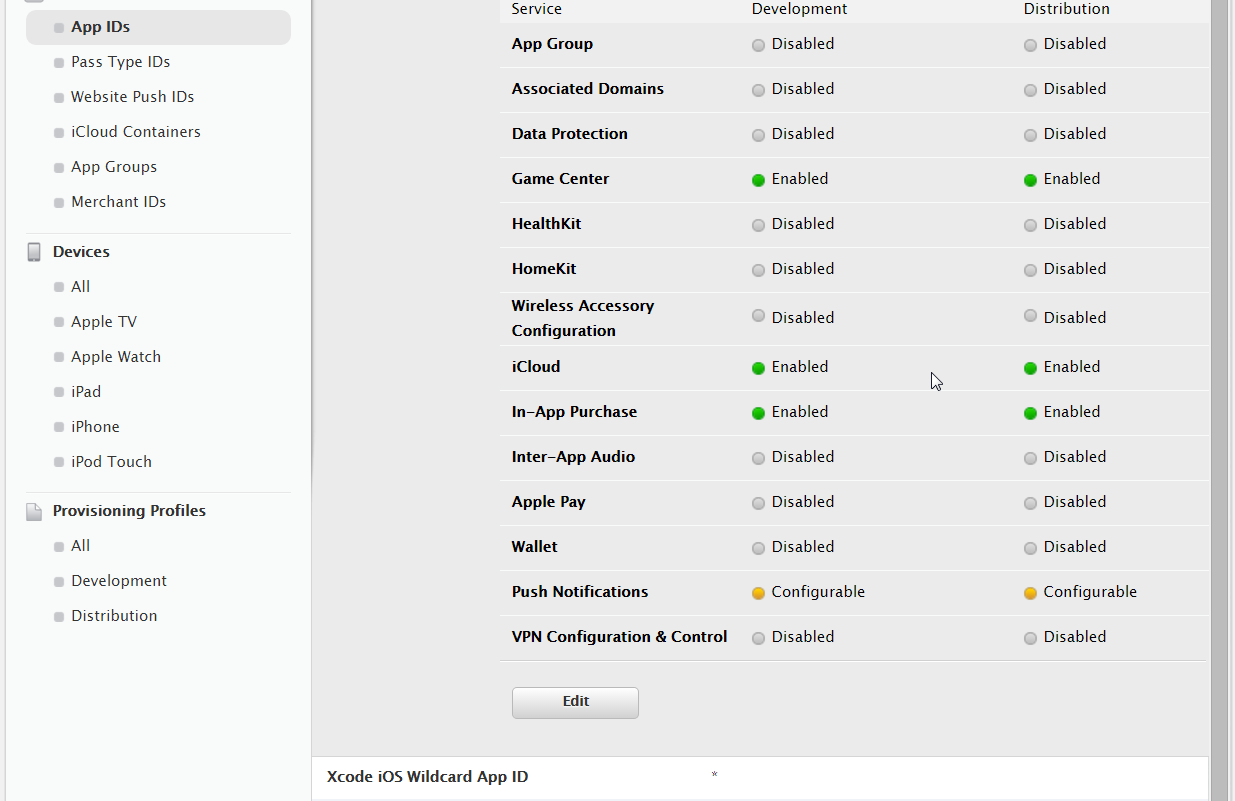
- App Services: check the iCloud option and select either Compatible with Xcode 5 or Include CloudKit support (requires Xcode 6), whichever suits the needs. Note: the status initially will be set to Configurable with a yellow indicator - that is OK.


- click Continue and complete the App ID creation process.

1. b) Existing app: Edit the App ID
- check the iCloud box option and select either Compatible with Xcode 5 or Include CloudKit support (requires Xcode 6), whichever suits the needs. Note: the status initially will be set to Configurable with a yellow indicator - that is OK.

2. In Xcode - create a new project or configure an existing project to enable iCloud Document entitlement.
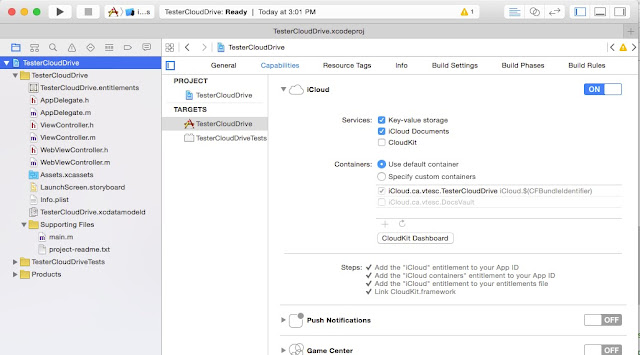
- select the project's target and open the Capabilities tab.


- expand the iCloud row and switch the iCloud ON. Xcode will create the project entitlement plist file, in this example named: iCloudDriveExplorer.entitlements

The contents of the project entitlements file will look similar to this:

<plist version="1.0">
<dict>
    <key>com.apple.developer.icloud-container-identifiers</key>
    <array/>
    <key>com.apple.developer.ubiquity-kvstore-identifier</key>
    <string>$(TeamIdentifierPrefix)$(CFBundleIdentifier)</string>
</dict>
</plist>

- check required iCloud services: Key-value storage, iCloud Documents and CloudKit, whatever is needed.


When enabling iCloud Documents, Xcode will offer to use either the default container or custom containers. Configuring custom containers is a subject for another post.
For the default container Xcode will add a container entitlement to the project entitlments file and will update the Provisioning Profile. After this step, the status indicator for iCloud in the Member Center will become green:


After Xcode adds containers to the project entitlement file, it will be similar to this:

<plist version="1.0">
<dict>
    <key>com.apple.developer.icloud-container-identifiers</key>
    <array>
        <string>iCloud.$(CFBundleIdentifier)</string>
    </array>
    <key>com.apple.developer.icloud-services</key>
    <array>
        <string>CloudDocuments</string>
    </array>
    <key>com.apple.developer.ubiquity-container-identifiers</key>
    <array>
        <string>iCloud.$(CFBundleIdentifier)</string>
    </array>
    <key>com.apple.developer.ubiquity-kvstore-identifier</key>
    <string>$(TeamIdentifierPrefix)$(CFBundleIdentifier)</string>
</dict>
</plist>

Important:
Enabling iCloud for an app requires an Xcode Developer Account with Agent or Admin role.
Even though Xcode allows to have multiple Developer Accounts (Xcode > Preferences > Accounts) and prompts to choose the account with which to enable iCloud, it may fail to create a container entitlement:
Add the "iCloud containers" entitlement to your App ID.

In this case Xcode will offer the Fix it option. However, running the Fix will not prompt for the Developer Account and may fail if the account Xcode choses to run with does not have Agent or Admin role.
One workaround is to remove, temporarily, other accounts from Xcode and only leave the Admin (or Agent) account. The other accounts can be exported into a file (Xcode > Preferences > Accounts > select Apple ID then click the Setting icon on the bottom left  > Export Developer Accounts).
When iCloud configuration complete, these accounts can be easily imported back.

Update:
In later versions of Xcode, for example 7.2, it is also possible to create and enable iCloud entitlements entirely from within Xcode. As long as the Developer Account has Agent or Admin role, Xcode will create App ID automatically. It will also modify the Provisioning Profile to enable iCloud service when the iCloud capability is switched on. And it will create entitlements for the default iCloud container. Manually creating App ID and enabling it for iCloud via Member Center is no longer the only option.


Friday, 17 October 2014

RestKit install - RKValueTransformers file not found


Adding the RestKit framework to an Xcode project manually, i.e. without using CocoaPods, results in project build errors similar to these:

Compile RKEntityMapping.m
'RKValueTransformers.h' file not found
  In file included from /.../RestKit-0.23.3/Code/CoreData/RKEntityMapping.m:21
  In file included from /.../RestKit-0.23.3/Code/CoreData/RKEntityMapping.h:22

Compile RKManagedObjectImporter.m
'RKValueTransformers.h' file not found
  In file included from /.../RestKit-0.23.3/Code/CoreData/RKManagedObjectImporter.m:26
0.23.3/Code/CoreData/RKMapperOperation.h:22

Up to and including version 0.20.3, adding the RestKit framework downloaded as a source zip file from GitHub required a few simple steps (todo: link) and worked easily on several projects.

Following the same procedure to add version 0.23.3 resulted in the errors shown above. 

Both files, i.e. RKValueTransformers.h and RKValueTransformers.m, are still referenced from the RestKit.xcodeproj but are not bundled into the zipped source.

It turns out that beginning with version 0.22.0, these 2 files were extracted from RestKit project into its own project on GitHub: https://github.com/RestKit/RKValueTransformers
The project needs to be downloaded separately (i.e. when not using CocoaPods for installation).
The two files can be simply copied into this directory under the RestKit:

RestKit-0.23.3/Vendor/RKValueTransformers

Unfortunately, that does not solve the whole problem. Apparently, packaging of the source code was changed and no longer includes dependencies such as AFNetworking, SOCKit and others.
So, if you persist in your stubbornness (as does this author) and still prefer to integrate RestKit into your project without CocoaPods, you're facing a very daunting option: download all dependencies manually and add them to the sub-directories inside the RestKit-0.23.3/Vendor.

Luckily, there is a faster way (only takes few minutes): the trick is to use CocoaPods to bring all dependencies into a helper project and then simply copy files into the target .

  • create a new simple project in Xcode. The template does not matter, Single View Application is fine. Project name just for example: RestKitPodsInstall
  • install CocoaPods (if the Mac does not have the package already):
    sudo gem install cocoapods
  • cd into the project directory, i.e. the directory that contains the Xcode project file (e.g. RestKitPodInstall.xcodeproj)
  • create a Podfile:
vi Podfile

platform :ios, '5.0'
pod 'RestKit', '~> 0.23.3'

(change the version to the latest available or whatever is needed)

  • install RestKit into the helper project by running:
pod --verbose install

It should finish with something like this:

Integrating client project

[!] From now on use `RestKitPodInstall.xcworkspace`.

Integrating target `Pods` (`RestKitPodInstall.xcodeproj` project)
  • copy, one by one, content of sub-directories in the Pods directory of the helper project to the target project. Keep in mind that the RestKit source already has placeholder directories for dependencies under the Vendor subfolder. The example below assumes that a manually downloaded RestKit-0.23.3 source code was placed under the Library directory in the target project named Algonquin. The current directory is the project directory of the helper project. (Also note the / at the end of the copied source directory)
mac:RestKitPodInstall vit$ cp -R Pods/AFNetworking/ /Users/vit/iOS-Projects/Algonquin/Algonquin/Library/RestKit-0.23.3/Vendor/AFNetworking

mac:RestKitPodInstall vit$ cp -R Pods/ISO8601DateFormatterValueTransformer/ /Users/vit/iOS-Projects/Algonquin/Algonquin/Library/RestKit-0.23.3/Vendor/ISO8601DateFormatterValueTransformer

mac:RestKitPodInstall vit$ cp -R Pods/RKValueTransformers/ /Users/vit/iOS-Projects/Algonquin/Algonquin/Library/RestKit-0.23.3/Vendor/RKValueTransformers

mac:RestKitPodInstall vit$ cp -R Pods/SOCKit/ /Users/vit/iOS-Projects/Algonquin/Algonquin/Library/RestKit-0.23.3/Vendor/SOCKit

mac:RestKitPodInstall vit$ cp -R Pods/TransitionKit/ /Users/vit/iOS-Projects/Algonquin/Algonquin/Library/RestKit-0.23.3/Vendor/TransitionKit

After all copying is done, the target project should have the structure similar to this:

Algonquin (it's the target project)
| Algonquin
| | main.m
| | VTAppDelegate.h
| | (other source files)
| | Library
| | | RestKit-0.23.3
| | | | RestKit.xcodeproj
| | | | Code
| | | | Resources
| | | | (other files)
| | | | Vendor
| | | | | AFNetworking
| | | | | | AFNetworking
| | | | | | | AFHTTPClient.h
| | | | | | | AFHTTPClient.m
| | | | | | | (other source files)
| | | | | | LICENCE
| | | | | | README.md
| | | | | RKValueTransformers
| | | | | | Code
| | | | | | | RKValueTransformers.h
| | | | | | | RKValueTransformers.m
| | | | | | LICENSE
| | | | | | README.md
| | | | | (rest of dependencies)
| | | (other libraries)
| Algonquin.xcodeproj
| AlgonquinTests


The target project should not be opened in Xcode during this procedure. When the copying complete, open the target project in Xcode. The project should compile without failures (assuming of course that RestKit was already previously configured and that is just a replacement to a newer version).

Friday, 22 August 2014

Ehcache CacheManager with same name already exists in the same VM

keys: Java, Ehcache, CacheManager name, multiple configurations

Straight to the point:

Explicitly providing a CacheManager name in an Ehcache configuration file allows to avoid the "CacheManager with same name already exists in the same VM" error after upgrading to Ehcache version 2.5 and later.
The CacheManager name should be specified in each Ehcache config file via the name attribute of the top-level ehcache element, for example:

ehcache.xml
<ehcache name="http-filter-cache"
    xmlns:xsi="http://www.w3.org/2001/XMLSchema-instance" xsi:noNamespaceSchemaLocation="ehcahce.xsd">
    <defaultCache />
</ehcache>
This works regardless whether a singleton or multiple instances of CacheManager are created.

In detail:

Ehcache is a widely used open-source caching solution for enterprise Java applications.
Most known examples, perhaps arguably, would be using Ehcache as a second-level Hibernate cache and the cache implementation in Apache Camel.
Version 2.5 was enhanced with a new feature called Automatic Resource Control. The ARC (finally) allowed to specify heap and disk allocations in bytes rather than in elements (as well as for Off Heap storage).

Problem:
After upgrading a Java web application to take advantage of the new version, we encountered a problem that manifested in failures of numerous JUnit tests. Launching the web application also started to fail.

Examining log files revealed the following error message:

CacheManager with same name already exists in the same VM. Please provide unique names for each CacheManager in the config or do one of following:

1. Use one of the CacheManager.create() static factory methods to reuse same CacheManager with same name or create one if necessary
2. Shutdown the earlier cacheManager before creating new one with same name.

The application included 2 Ehcache configuration files each containing a default cache definition as well as several other named caches. At first, a suspicion was that the problems were caused by having more than one default cache (each file contains a default cache definition). Since the default caches are unnamed, there might have been a collision. That's however proved to be a totally wrong lead.

Proceeding to examine the source code of net.sf.ehcache.CacheManager class, we came across this javadoc comment in class constructors:

Since 2.5, every newly created CacheManager is registered with its name (uses a default name if unnamed), and trying to create multiple CacheManager with same names (or multiple unnamed CacheManagers) is not allowed and throws an exception.

Looking further into the source code and stepping in with the debugger, we discovered that CacheManager now maintains a static Map<String, CacheManager> class variable to store every instance of the class created in the JVM using the name specified in a configuration as the key (the map is named CACHE_MANAGERS_MAP as of version ehcache-core 2.6.9).

All constructors and the factory methods utilize the map to return a CacheManager object according to the specs. The CacheManager provides two kinds of instantiation modes: creating a new instance on each call or returning an existing object (singleton). (More on CacheManager creation modes can be found on a Ehcache website).

Regardless of the creation mode, i.e. instance or singleton, the CacheManager name must be unique.

Surprisingly, considering that the change is quite well documented, the Ehcache documentation does not spell out, at least not readily, how to assign a name to a CacheManager instance.
The answer was found in the ehcache.xsd schema that specifies the optional name attribute for the ehcache element:
<xs:schema>
    <xs:element name="ehcache">
        <xs:complexType>
            <xs:attribute name="name" use="optional"/>
            <xs:sequence>
                <xs:element maxOccurs="1" minOccurs="0" ref="diskStore"/>
                ...
            </xs:sequence>
            ...
When the name attribute is specified for the the top-level ehcache element, a CacheManager constructor will use its value as the name for the CacheManger instance and as the key when registering the object in the static CACHE_MANAGERS_MAP map. Otherwise, i.e. when the name attribute is omitted, CacheManager will use a default value, __DEFAULT__, as the name. If the app is designed to use a single ehcache configuration, it will not cause any trouble. However, there are cases when it's preferable to use multiple cache configuration files. In which case it will result in the error when the name attribute is not used.

To avoid the problem, each Ehcache configuration should specify a name. The fragment from a configuration file below is an example:
<ehcache name="http-filter-cache" xmlns:xsi="http://www.w3.org/2001/XMLSchema-instance" xsi:noNamespaceSchemaLocaton="ehcache.xsd">
   <!-- CacheManager configuration
       (omitted from the sample)
   />
</ehcache>
And in conclusion, a friendly suggestion to the Ehcache development team: maybe the name attribute should be made mandatory rather than optional to avoid the problem described in this post.

Tuesday, 5 August 2014

Spring Framework Annotation-based Configuration

With seemingly en masse transition of Java Spring framework users to annotation-based configuration, it sometimes can be quite frustrating to find yourself in a corner when a context configuration easily achievable with XML, can not be realized via annotations.
These are 2 examples:

  • configuring multiple service instances of the same class (not the prototype scope kind of multiplicity).
  • auto wiring of a service implementation based on a configuration parameter.
The first case:

Suppose there is a need to have 2 service beans of the same service implementation. (Of course, to have sense, the bean instances need to be distinct, for example by setting their instance variables to different values).
With an XML config, that can be easily achieved by declaring 2 beans with different ID values, for example:
<bean class=“DocumentServiceImpl” id=“documentService”/>
<bean class=“DocumentServiceImpl” id=“loggingDocumentService”>
    <property name=“shouldLogRequests” value=“true”/>
</bean>

Then, these beans can be configured for injection either in XML via the ref parameter:

<bean class=“DocumentServiceController”>
    <property name=“documentService” ref=“documentService”/>
    <property name=“loggingDocumentService” ref=“loggingDocumentService”/>
</bean>

Or alternatively, even autowiring like this:

public class DocumentServiceController {
 @Autowired
 @Qualifier("baseDocumentService")
 private DocumentService baseDocumentService;

 @Autowired
 @Qualifier("loggingDocumentService")
 private DocumentService loggingDocumentService;
}

The same simply cannot be done via type-level annotations (or, at least not as easily).
This is an annotation based configuration similar to the XML above:
@Service
public class BaseDocumentService implements DocumentService {
}

However, since the @Service annotation takes only a single String parameter, there is simply no way to instantiate a second bean of the same class assigning it a different name or id.

Even though this seems to be a conscious design choice of Spring framework architects (see below; note, the emphasis is the author's), it still can be maddeningly frustrating while looking for a solution.

From a Spring doc at 4.11.3 Fine-tuning annotation-based autowiring with qualifiers
For a fallback match, the bean name is considered as a default qualifier value. This means that the bean may be defined with an id "main" instead of the nested qualifier element, leading to the same matching result. However, note that while this can be used to refer to specific beans by name, @Autowired is fundamentally about type-driven injection with optional semantic qualifiers. This means that qualifier values, even when using the bean name fallback, always have narrowing semantics within the set of type matches; they do not semantically express a reference to a unique bean id. Good qualifier values would be "main" or "EMEA" or "persistent", expressing characteristics of a specific component - independent from the bean id (which may be auto-generated in case of an anonymous bean definition like the one above).

So, to comply with this design, the following approach should be used to achieve the goal of having multiple service bean instances of the same class:

  • Create a new implementation that extends the base service class.
  • Define a post construct method in this new class that sets parameters that would make a second instance to be different.

@Service(“loggingDocumentService”)
public class LoggingDocumentService extends DocumentServiceImpl {
   @PostConstruct
   public void postConstruct() {
       super.setShouldLogRequests(true);
   }
}

Okey, that is not too high price for switching to annotations-based configuration. It actually may promote a better object design, i.e. using subclassing to extend the behaviour of a class rather than using an instance variable and if-else statements for controlling its logic (though it’s not always possible).

Let’s now look at the second scenario.
Under this scenario, there are two different implementations of the same interface (see example below).
Suppose there is also a controller that should be configured via an environment property to use a particular service implementation. For instance, setting an environment configuration property, say document.service.caching.enabled=true, should result in Spring injecting the service implementation that provides document caching capabilities.

public class BaseDocumentService implements DocumentService {
}
public class CachingDocumentService extends BaseDocumentService {
}

public class DocumentServiceController {
    private DocumentService documentService;
}

When using XML configuration, this can be easily achieved by, by way of illustration, using a SpEL expression:

<bean class="BaseDocumentService" id="baseDocumentService" />
<bean class="CachingDocumentService" id="cachingDocumentService" />
<bean class="DocumentServiceController" id="documentServiceController">
    <property name="documentService" ref="#{'${document.service.caching.enabled}'=='yes' ? 'cachingDocumentService' : 'baseDocumentService'}" />
</bean>

With annotations-based Spring configuration, we would need to annotate an instance variable in the controller using the @Qualifier annotation:

@Controller
public class DocumentServiceController {
    @Autowired
    @Qualifier("documentService")
    private DocumentService documentService;
}

Had the @Qualifier annotation accepted property placeholders, that would be the end of the story.
Unfortunately, Spring architects decided not to resolve placeholders in the @Qualifier. Neither there is support for SpEL expressions.
Good news is that it's still possible to solve this task, bad news is that the solution is quite verbose.

First, we would need to implement a FactoryBean<T> interface:

@Component("documentServiceFactory")
@DependsOn({"baseDocumentService", "cachingDocumentService"})
public class DocumentServiceFactory implements FactoryBean<DocumentService> {
    @Autowired
    @Value("${document.service.caching.enabled}")
    private boolean enableDocumentCaching;

    @Autowired
    @Qualifier("baseDocumentService")
    private DocumentService baseDocumentService;

    @Autowired
    @Qualifier("cachingDocumentService")
    private DocumentService cachingDocumentService;

    @Override
    public DocumentService getObject() throws Exception {
        return enableDocumentCaching ? cachingDocumentService : baseDocumentService;
    }

    @Override
    public Class<?> getObjectType() {
        return DocumentService.class;
    } 
}

Second, the qualifier on the service reference in the controller needs to specify the factory bean rather than a service bean. Note though, the type of the reference remains of the service interface (i.e. not of the factory):

@Controller
public class DocumentServiceController {
    @Autowired
    @Qualifier("documentServiceFactory")
    private DocumentService documentService;
}

A drawback of this solution is that at runtime there still going to be 2 beans in the memory while only one will be served by the factory to the controller. However, considering that service bean implementations should not take up too much memory since they need to be thread-safe (i.e. limited number of instance variables), that drawback should not represent a tangible problem.
And forerunning a potential question: Why would it be desired to have an annotation-only Spring configuration? True, typically in medium and large applications it's not practical. But in small programs, like a job or utility, the program becomes tidy when everything is configured through annotations. The other main usage  is for JUnit tests. It's impractical to bring up the whole context of a large application for running a JUnit, so instead of creating a myriad of test-specific contexts, it's much productive to have JUnits fully configurable via annotations.

Saturday, 4 January 2014

Xcode Build for iOS - conditional copy of resource files based on Build Configuration

A brief: Use Run Script build phase in Xcode to selectively copy resource files, such as Settings.bundle, security certificates, etc., depending on the build configuration, e.g. Debug or Release.
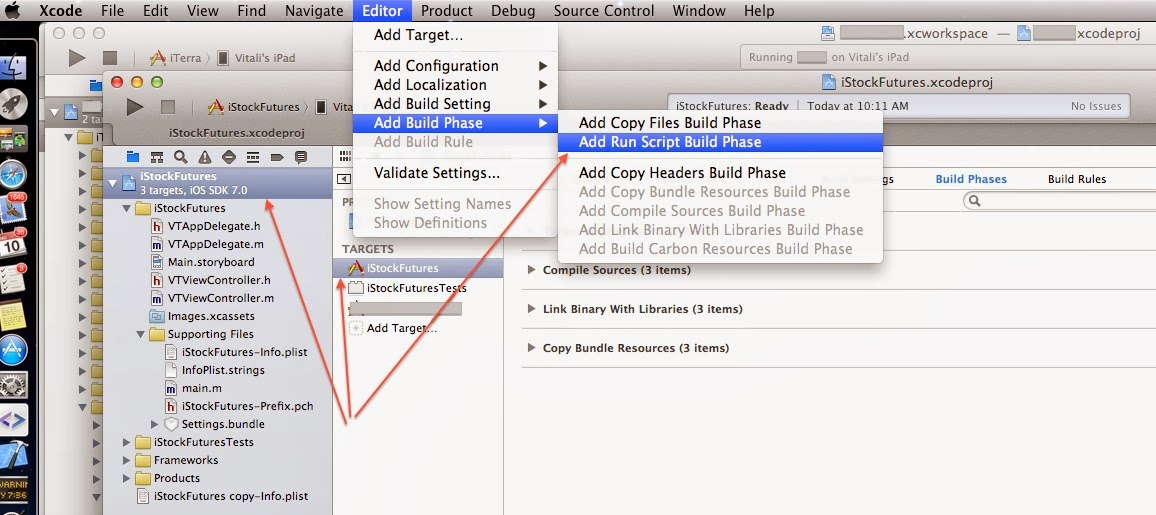
How-To: Project Navigator: select a project, select a target, select Build Phases tab; menu: Editor > Add Build Phase > Add Run Script Build Phase.

In detail:
Couple days ago I needed to make a minor change to how we compile/build our iOS app. The app has a few settings but all of them for development only. While preparing a submission to Apple, we wanted to remove the app from the Settings view on iPad completely. The challenge was to keep the settings for developer builds. This proved to be a bit more difficult than expected. Hence, a post to document how it can be done as well as a few things learned about Build Project settings, Targets, Build Configurations, Schemes, logs etc. in Xcode (v5).  

For an iOS app to have an entry to the standard Settings view, the app needs to include a Settings.bundle file (which is actually a directory on the file system, by the way). When the file is added to a project (any file for that matter actually), Xcode allows to selectively include it into the project's targets. Normally, an Xcode project would have the main target (named after the app) and a test target. So, one way to conditionally include a file, Settings.bundle in my case, into the build is to duplicate the main target and use that duplicated target for developer builds only. For example, let's say our app name is iStockFutures and by default the main target is iStockFutures. We could've duplicated that target into iStockFutures-Dev and kept the Settings.bundle file as a member of the iStockFutures-Dev target only. A sample screenshot is shown below.


That would accomplish the task. But there is drawback - having multiple targets means that developers have to be mindful when adding new files (any new file) and better not forget to include it into both targets. When running the app in Xcode, the dev target then should be used but when committing code to a build server, it had better be tested on both targets. Needless to say, my development team was not thrilled on that prospect. 

Luckily, there is a more transparent way:

The build process in Xcode includes multiple phases. One of them is Copy Bundle Resources. The phase has a list of resource files to copy. When the Settings.bundle was added to the project, Xcode automatically included it into that list. Unfortunately, Xcode 5 does not allow to have multiple versions of the list based on Configuration, e.g. Release or Debug. Not sure why Apple didn't do it, after all, such capability exists and is widely used in Build Settings. Anyway, this can be easily achieved by using a Run Script phase. Run Script is a feature in Xcode that allows to execute a custom script while building a Product (i.e. an App). Multiple script languages are supported (see the link above) but since all what we need to do is to copy a file, ah, sorry, I meant a directory, we just going to use the standard /bin/sh.
To create a Run Script phase, select the project in the Project Navigator, then make sure that a target is selected (otherwise the menu will be greyed out/disabled).
Then use the Editor menu to add a Run Script phase: Editor > Add Build Phase > Add Run Script Build Phase


When it's added, expand the Run Script phase and add this script (modify it as needed, of course) that copies Settings.bundle if build is run in Debug configuration:

echo "Checking configuration to determine whether to copy Settings.bundle: CONFIGURATION=$CONFIGURATION"
if [ "$CONFIGURATION" == "Debug" ]; then
echo "Copying ${SRCROOT}/${PRODUCT_NAME}/Settings.bundle directory to ${BUILT_PRODUCTS_DIR}/${PRODUCT_NAME}.app"
cp -R ${SRCROOT}/${PRODUCT_NAME}/Settings.bundle ${BUILT_PRODUCTS_DIR}/${PRODUCT_NAME}.app/Settings.bundle
echo "Settings.bundle directory has been copied."
else
echo "Skipped copying Settings.bundle - not required for $CONFIGURATION configuration."
fi

Now, remove the Settings.bundle from the target, iStockFutures in the sample app.
(There are at least 2 ways to do that - either edit the list under Copy Bundle Resources or select Settings.bundle in Project Navigator and uncheck all targets in the File Inspector's Target Membership [View > Utilities > Show File Inspector]).
This is important:

  • Run Product > Clean before running Product > Build, otherwise the Settings.bundle copied before will still be packaged into the app.
  • Uninstall the app from the device and/or simulator - that will remove the app entry from the Settings app.

Also, if you played with the solution presented first, i.e. a dev target, remember to remove that dev target.

Let's build the product in Debug configuration first and look into Xcode build log files to verify the script is being run.

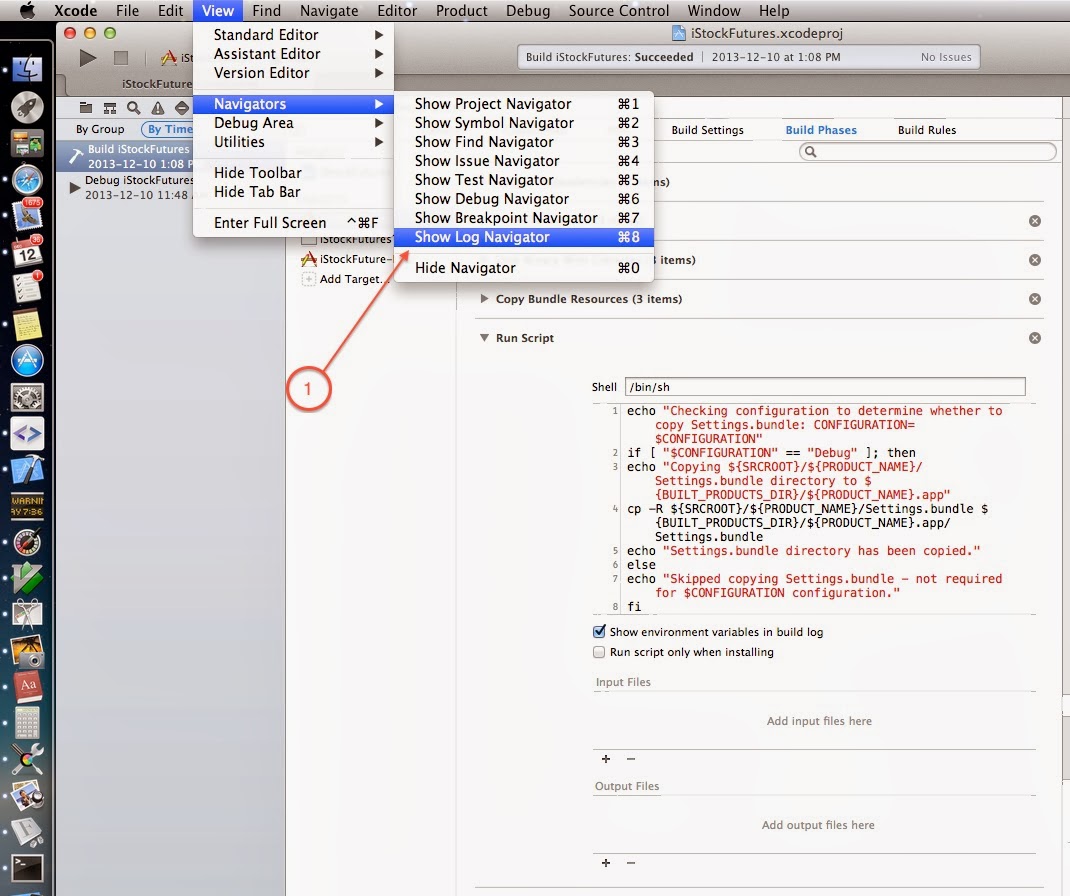
Hint: Where to find Xcode build logs: from the menu: View > Navigators > Show Log Navigator


Select the default group and the All Messages option: 


This is it for building in Debug configuration.

To fully complete the work we need to verify it builds correctly in Release configuration as well. It can be done by running a command-line build configured to Release (a default configuration setting on the Project) on the team's CI (Continuous Integration) server. But of course a better approach is to test it on a developer's Mac beforehand.
An Xcode's feature called Scheme comes handy here (more info). It allows to maintain multiple sets of targets each configured to a specific Build Configuration, i.e. Debug or Release.

A new scheme can be created via the Product > Scheme menu.

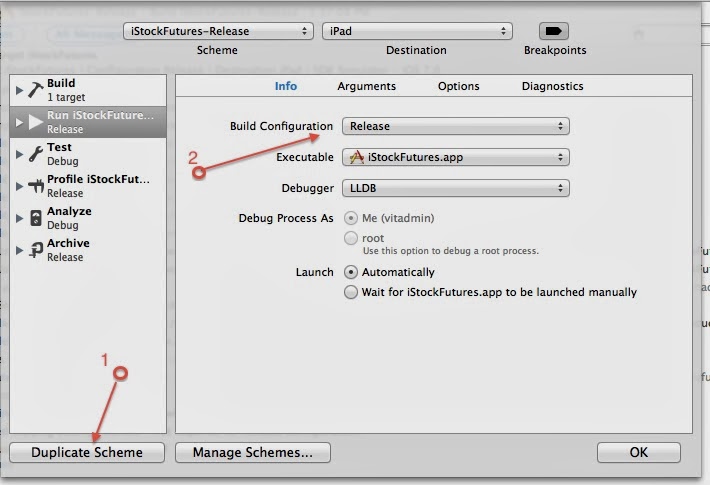
Select Product > Scheme > Edit Scheme…, then Duplicate one of the existing schemes (1) and change the Build Configuration to Release (2):


After creating and configuring a new scheme, make it active by selecting it in Product > Scheme > iStockFutures-Release menu.
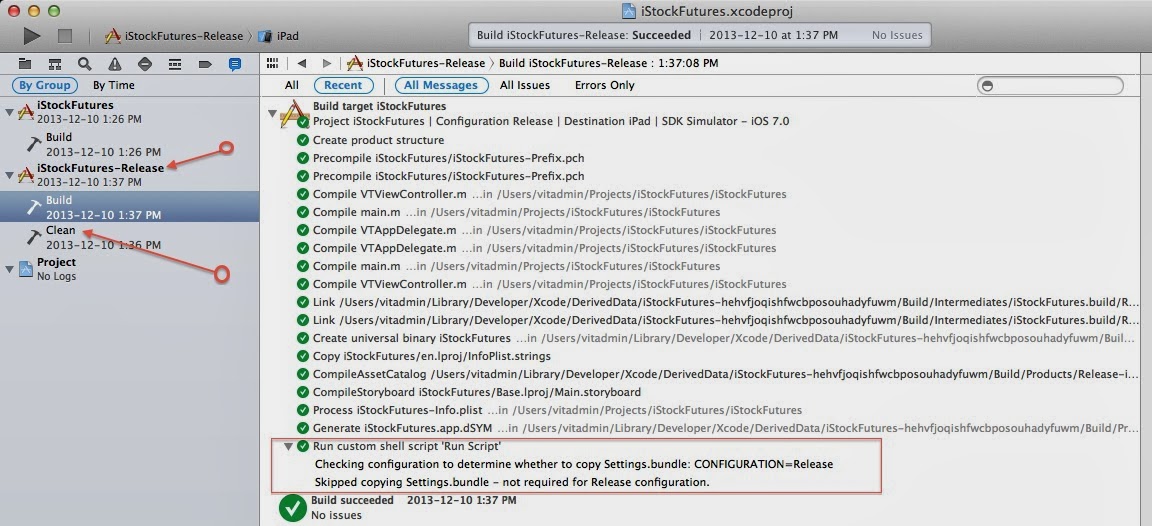
Build the app by running Product > Clean and Product > Build. When completed, check the build log file.


That should be all.

Ok, that's not been very complicated, why it took more time than expected? That's because a bulk went into attempting to figure out and tinkering with Xcode environment variables. 

Here is a couple things that helped.

How to print all Xcode environment variables:
Open a Terminal window, change the directory to the project directory, i.e. the one that contains <project_name>.xcodeproj file and run this command:

xcodebuild -project iStockFutures.xcodeproj -target "iStockFutures" -showBuildSettings > iStockFutures-build-settings.txt

All Xcode settings will be saved in the specified file. Replace iStockFutures with your project, of course.

Official Xcode Build Settings Reference doc from Apple:


And a last tip - for successful builds the log file does not show too many details. However, add a faulty Run Script build phase, something like this for example:

cp ${SRCROOT}/file-that-doesnot-exist.txt ${BUILT_PRODUCTS_DIR}/file-that-doesnot-exist.txt

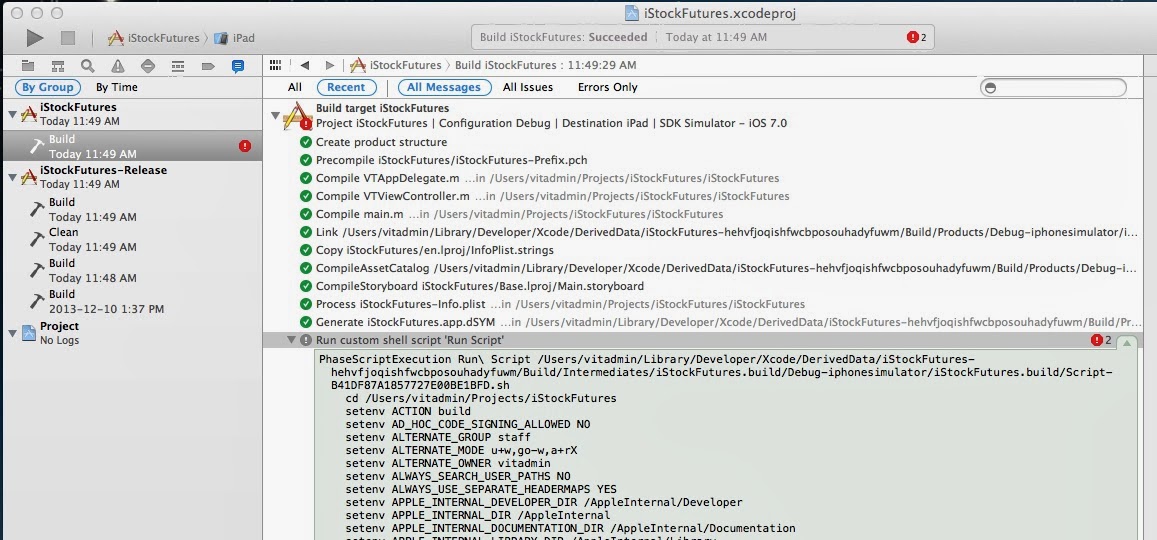
Build fails and the log file can be expanded to see quite a bit of details; it might be handy in understanding how the build works:


Conclusion

By the way, the Run Script approach can be used to copy not only Settings.bundle but other environment-specific files. For example, we also used the script to copy Development and UAT/Production security certificates that we use for 2-way SSL/TLS authentication.


Monday, 10 December 2012

Running statistics on Oracle tables from Java program.

Oracle database query optimizer relies heavily on statistics. These statistics are used by the query optimizer to choose the best execution plan for each SQL statement. Normally, having correct and up-to-date statistics falls under DBA responsibilities (Oracle recommends automatic statistics gathering). However, there are cases when it might be necessary to update statistics manually, and moreover, at runtime directly from a Java program. For example, when data had been reloaded into the tables and now need to be accessed from a Java batch program while database instance is not configured for automatic statistics update. Below is an example of Java code that implements a method to gather statistics for a particular table. The code is based on the JdbcDaoSupport class from Spring framework but it is a simple convenience and author's preference - there is nothing that would prevent from porting this code to the standard plain JDBC implementation.
/*
 * Copyright 2012 VT Enterprise Software Consulting Inc.
 *
 * Licensed under the Apache License, Version 2.0 (the "License");
 * you may not use this file except in compliance with the License.
 * You may obtain a copy of the License at
 *
 *      http://www.apache.org/licenses/LICENSE-2.0
 *
 * Unless required by applicable law or agreed to in writing, software
 * distributed under the License is distributed on an "AS IS" BASIS,
 * WITHOUT WARRANTIES OR CONDITIONS OF ANY KIND, either express or implied.
 * See the License for the specific language governing permissions and
 * limitations under the License.
 */

package com.vtesc.examples.db;

import java.sql.Types;

import org.springframework.jdbc.core.JdbcTemplate;
import org.springframework.jdbc.core.SqlParameter;
import org.springframework.jdbc.core.namedparam.MapSqlParameterSource;
import org.springframework.jdbc.core.namedparam.SqlParameterSource;
import org.springframework.jdbc.core.simple.SimpleJdbcCall;
import org.springframework.jdbc.core.support.JdbcDaoSupport;
import org.springframework.transaction.annotation.Propagation;
import org.springframework.transaction.annotation.Transactional;

/**
 * Demonstrates invocation of dbms_stats.gather_table_stats procedure
 * to gather an Oracle table statistics.
 * @author Vitali Tchalov
 */
public class JavaOracleStats extends JdbcDaoSupport {
 /**
  * Updates statistics for table in schema using
  * Oracle dbms_stats.gather_table_stats procedure.
  * 
  * @param schema
  * @param table
  */
 @Transactional(readOnly = false, propagation = Propagation.REQUIRES_NEW)
 public void gatherTableStats(String schema, String table) {
  JdbcTemplate jdbcTemplate = new JdbcTemplate(getJdbcTemplate()
    .getDataSource());
  jdbcTemplate.setResultsMapCaseInsensitive(true);

  SimpleJdbcCall gatherStats = new SimpleJdbcCall(jdbcTemplate)
    .withProcedureName("dbms_stats.gather_table_stats")
    .withoutProcedureColumnMetaDataAccess()
    .useInParameterNames("ownname", "tabname")
    .declareParameters(new SqlParameter("ownname", Types.VARCHAR),
     new SqlParameter("tabname", Types.VARCHAR));
  SqlParameterSource in = new MapSqlParameterSource().addValue("ownname",
    schema).addValue("tabname", table);

  gatherStats.execute(in);
 }
}

This is a fully tested and usable code. But I plan to package this example along with a JUnit test, Spring context file and other artefacts and will publish when ready.

Friday, 14 September 2012

Frequently used SQL DDL statements

A collection of reference examples of SQL DDL (Data Definition Language) statements frequently used in application development to create and alter database tables, synonyms, constraints, indexes etc. 
Note: The statements have been tested on Oracle 11G database; most probably should work with other relational databases. Some of the datatypes used in the samples are Oracle-specific and would require some tweaking.

-- Create a table
CREATE TABLE TX_HISTORY (
  tx_id      NUMBER(10, 0) NOT NULL,
  stock_id   NUMBER(10, 0) NOT NULL,
  tx_date    DATE          NOT NULL,
  currency   VARCHAR2(5)   NOT NULL,
  price      NUMBER(9, 2)  NOT NULL,
  price_2    NUMBER
)
/

-- Create a table with a PK (Primary Key) on a single column
CREATE TABLE STOCK (
  stock_id      NUMBER(10, 0) NOT NULL,
  symbol        VARCHAR2(5)   NOT NULL,
  stk_exchange  VARCHAR2(5)   NOT NULL,
  currency      VARCHAR2(5)   NOT NULL,
--  
  CONSTRAINT stock_id_pk PRIMARY KEY (stock_id)
)
/

-- Add a PK (Primary Key) to already existing table
ALTER TABLE tx_history ADD CONSTRAINT tx_history_pk PRIMARY KEY (tx_id)
/

-- Create a table with a FK (Foreign Key) to another table
CREATE TABLE STOCK_HISTORY (
  rec_id        NUMBER(10, 0) NOT NULL,
  stock_id      NUMBER(10, 0) NOT NULL, -- FK to STOCK table
  trade_date    DATE          NOT NULL,
  open_price    NUMBER(9, 2)  NOT NULL,
  close_price   NUMBER(9, 2)  NOT NULL,
--  
  CONSTRAINT stock_history_stock_fk FOREIGN KEY (stock_id) REFERENCES stock (stock_id) ENABLE VALIDATE
)
/

-- Add a FK (Foreign Key) to already existing table to reference another table
ALTER TABLE tx_history ADD CONSTRAINT tx_history_stock_fk FOREIGN KEY (stock_id) REFERENCES stock (stock_id) ENABLE VALIDATE
/
-- Drop (delete) a table
DROP TABLE TX_HISTORY
/

-- Add a new column to an existing table
ALTER TABLE TX_HISTORY ADD QTY NUMBER
/

-- Drop a column
ALTER TABLE TX_HISTORY DROP COLUMN PRICE_2
/

Wednesday, 15 August 2012

NoClassDefFoundError and ClassNotFoundException errors when running standalone Java programs

This post is intended as a collection of various cases related to Java CLASSPATH issues that cause NoClassDefFoundError and ClassNotFoundException errors that are often mysterious and sometimes quite difficult to troubleshoot. 
The addressed cases go beyond trivial causes of missing jar files or mistyped package names.

Case I - A standalone Java program is packaged into a jar file. The JAR includes a seemingly correct manifest specifying the main class and the program classpath as in the sample below:

MANIFEST.MF file:


Manifest-Version: 1.0
Main-Class: com.vtesc.batchjobs.daily.txprocessor.Launcher
Class-Path: . ./txprocessor.jar ./lib/spring.jar ./lib/commons-logging.jar ./lib/ojdbc6.jar d:/common/lib/dbaccess.jar


The txprocessor.jar file is correctly built by an Ant build script and has a totally correct structure and contents:


Everything seems to be perfectly fine but when run, it fails with classloader errors (Java version "1.6.0_29"):


D:\batchjobs\txprocessor>java -jar txprocessor.jar
Exception in thread "main" java.lang.NoClassDefFoundError: com/vtesc/batchjobs/daily/txprocessor/Launcher
Caused by: java.lang.ClassNotFoundException: com.vtesc.batchjobs.daily.txprocessor.Launcher
        at java.net.URLClassLoader$1.run(URLClassLoader.java:202)
        at java.security.AccessController.doPrivileged(Native Method)
        at java.net.URLClassLoader.findClass(URLClassLoader.java:190)
        at java.lang.ClassLoader.loadClass(ClassLoader.java:306)
        at sun.misc.Launcher$AppClassLoader.loadClass(Launcher.java:301)
        at java.lang.ClassLoader.loadClass(ClassLoader.java:247)
Could not find the main class: com.vtesc.batchjobs.daily.txprocessor.Launcher. Program will exit.

Cause:
The returned error displaying the "Could not find the main class" message can be actually quite misleading as it may make you to suspect some problem with the main class. However, in this case it has absolutely nothing to do with the main class. The cause of the error is actually in the Manifest file on the Class-Path: line:

d:/common/lib/dbaccess.jar


Hard-coding an absolute path to a library is a very bad practice in itself but specifying the path without indicating a protocol causes the total failure. By default, the Java platform uses the java.net.URLClassLoader class for loading program classes. As its name implies, the URLClassLoader uses another system class, java.net.URL for specifying the resource location. The URL class complies with a number of RFC documents and it requires the file:/ protocol to be specified for file system resources.

The problem can be corrected by prefixing the absolute path to the dbaccess.jar file with the file:/ protocol as shown below:


Manifest-Version: 1.0
Main-Class: com.vtesc.batchjobs.daily.txprocessor.Launcher
Class-Path: . ./txprocessor.jar ./lib/spring.jar ./lib/commons-logging.jar ./lib/ojdbc6.jar file:/d:/common/lib/dbaccess.jar


Yet, a better way would be not to use absolute paths. Case in point, using the Windows specific path here will confine this Java program to the Windows platform which goes against the Java platform-independence principle.
But we live in a world which is far from perfect and sometimes one finds himself forced to follow requirements even if they go against best practices and common sense.

Thursday, 9 August 2012

Samples of control files for Oracle SQL Loader

This is intended as a quick reference to provide a set of templates for creating SQL Loader control files for most frequently used scenarios.

Sample 1:
Loading data from a TAB-delimited file: FIELDS TERMINATED BY X'09'
The sample also demonstrates the following techniques:
  • skip lines: OPTIONS (SKIP=1)  instructs the SQL Loader to skip the first line (the number specifies the number of lines)
  • auto-generate values for a primary key column: SEQUENCE(MAX, 1)
  • load data by adding more rows without truncating the existing data: APPEND
  • load into DATE type columns: "TO_DATE(:TX_DATE,'MM/DD/YYYY')"

-- ============================================================
-- stocktx.ctl
-- SQLLDR Control File for data loading to STOCKTX table.
--
-- The input file has the TAB-separated format with a single line per table row.
--
-- To run (sample):
--   sqlldr batchjob/<pwd>@oradb control=stocktx.ctl errors=1000 log=logs/stocktx_load.log

OPTIONS (SKIP=1) load data
  infile 'data/stocktx_data.tab'
  badfile 'logs/stocktx_data.bad'
  discardfile 'logs/stocktx_data.discard'
  APPEND
  into table portfolio.stocktx
  FIELDS TERMINATED BY X'09'
  trailing nullcols
(
    TX_ID        SEQUENCE(MAX, 1),
    EXCHANGE,
    SYMBOL,
    QTY,
    PRICE,
    TX_DATE      "TO_DATE(:TX_DATE,'MM/DD/YYYY')"
)

Sample 2:
Loading data from a multicharacter-delimited file (^|^) file: FIELDS TERMINATED BY '^|^'
The sample also demonstrates the following techniques:
  • delete existing data prior to the load: TRUNCATE
  • specify the data file name on the command line: data=addr.dsv
  • specify log files pathnames via command line parameters (as opposite to hard-coding in the control file).
  • evaluate the source values and transform on a condition, e.g if the Postal Code is "N/A", replace it with NULL: ZIP_CODE "decode(:ZIP_CODE, 'N/A', '', :ZIP_CODE)"
  • apply the current time/date to a DATE column: SYSDATE 
  • CONSTANT - allows to set a column to a constant value; this value is hard-coded into the control script file, not from the input data file. The value is treated as a character string; SQLLDR will attempt to convert it to the column type if required.
-- ============================================================
-- addr.ctl
-- SQLLDR Control File for data loading to ADDR table.
--
-- The input file the '^|^' sequence of characters to separate values.
--
-- To run (sample):
-- sqlldr batchjob/@oradb control=addr.ctl errors=100 log=logs/addr_load.log bad=logs/addr.bad discard=logs/addr.discard data=addr.dsv
--
-- Note: the logs directory needs to be created prior to running the script.

OPTIONS (SKIP=0)

load data
  TRUNCATE
  into table ADDR
  FIELDS TERMINATED BY '^|^'
  trailing nullcols
(
    ADDR_ID SEQUENCE(MAX, 1),
    CITY,
    STREET_NUM,
    STREET_NAME,
    STREET_DIR,
    ZIP_CODE    "decode(:ZIP_CODE, 'N/A', '', :ZIP_CODE)",
    MODIFIED_ON SYSDATE,

    BATCH_ID    CONSTANT 1
)

This is a table structure for the sample above:
CREATE TABLE ADDR (
  addr_id      NUMBER(10)     NOT NULL,
  city         VARCHAR2(40)   NOT NULL,
  street_num   NUMBER         NOT NULL,
  street_name  VARCHAR2(40)   NOT NULL,
  street_dir   VARCHAR2(4)    NOT NULL,
  zip_code     VARCHAR2(7),
  modified_on  DATE           NOT NULL,
  batch_id     NUMBER,
--  
  CONSTRAINT addr_id_pk PRIMARY KEY (addr_id)
)
/
Sample 3:
SQLLDR control file to load data from a comma-separated file (,) where field values may be enclosed in double-quotes (").


Control file explanation:
  • FIELDS TERMINATED BY ',' - specifies that the fields are delimited by comma.
  • OPTIONALLY ENCLOSED BY '"' - specifies that field values may (or may not) be enclosed in double quotes, for example: "2269 Lake Shore Blvd. W., Toronto, ON"
    This is often required if the data can contain characters that are used for field separation, the comma character in this particular example.
  • SEQUENCE(COUNT, 1) - this is usually used to generate unique values for the table primary key. The COUNT parameter specifies that the 1st value to be the number of records in the table before the load plus 1.
  • --  INTO TABLE ADDR.STREET_VALUES_BAK - a commented out line; it is handy during the development phase when the control file can be re-used to load data into different tables.
  • "UPPER(:ALT_STREET_NAME)" - convert the values to the upper case.
  • CREATE_DATE "TO_DATE(TO_CHAR(SYSDATE, 'YYYYMMDD'), 'YYYYMMDD')" - this is useful to load only the date part of the current time into DATE type columns.
    SYSDATE returns the current time which is formatted into a string containing Year, Month, and Day which in turn converted back to DATE type.
  • BATCH_ID EXPRESSION "(SELECT MAX(BATCH_ID) FROM ADDR.BATCH_ID WHERE TABLE_NAME = 'STREET_ALTERNATIVE')" - useful to insert a constant value for each data load, for a example a Batch ID or Run ID.
    A separate table is required, of course, to maintain load data IDs. A new record can be inserted into this table from a shell script prior to invoking the SQLLDR script. See a DDL and INSERT statement below.
-- =============================================================
-- street_alternative.ctl
-- Loading alternative street names.
-- SQLLDR Control File for data loading into ADDR.STREETS_ALTERNATIVE table.
--
-- The input file is |-separated in double quotes.
-- sqlldr vit1@devdb1 control=street_alternative.ctl errors=1 log=logs/street_alternative.log bad=logs/street_alternative.bad discard=logs/street_alternative.discard data=street_alternative.txt
--

OPTIONS (SKIP=1)

LOAD DATA
  APPEND
  INTO TABLE ADDR.STREET_ALTERNATIVE
--  INTO TABLE ADDR.STREET_VALUES_BAK
  FIELDS TERMINATED BY ','
  OPTIONALLY ENCLOSED BY '"'
  TRAILING NULLCOLS (
  REC_ID            SEQUENCE(COUNT, 1),
  STREET_ID,
  ALT_STREET_NAME   "UPPER(:ALT_STREET_NAME)",
  CREATE_DATE       "TO_DATE(TO_CHAR(SYSDATE, 'YYYYMMDD'), 'YYYYMMDD')",
  BATCH_ID          EXPRESSION "(SELECT MAX(BATCH_ID) FROM ADDR.BATCH_ID WHERE TABLE_NAME = 'STREET_ALTERNATIVE')"
)


DDL for the tables used in the sample #3 above:
CREATE TABLE ADDR.STREET_ALTERNATIVE (
  rec_id          NUMBER       NOT NULL,
  street_id       NUMBER       NOT NULL,
  alt_street_name VARCHAR2(40) NOT NULL,
  create_date     DATE         NOT NULL,
  batch_id        NUMBER       NOT NULL,
--  
  CONSTRAINT rec_id_pk PRIMARY KEY (rec_id)
)
/
CREATE TABLE ADDR.BATCH_ID (
  rec_id          NUMBER        NOT NULL,
  table_name      VARCHAR2(255) NOT NULL,
  batch_id        NUMBER        NOT NULL,
  create_date     DATE          NOT NULL,
 --  
  CONSTRAINT batch_id_pk PRIMARY KEY (rec_id)
)
/
-- A statement to insert a record into the BATCH_ID table for
-- the next value to be used in a data load:
insert into ADDR.BATCH_ID values (1, 'STREET_ALTERNATIVE', 
  (select nvl(max(batch_id), 0) from ADDR.BATCH_ID
    where table_name = 'STREET_ALTERNATIVE') + 1, sysdate)
/

Thursday, 5 July 2012

Oracle Database Management for Application Developers

A set of how-to's and tips for managing an Oracle 10g/11g database targeted for non-DBA folks such as Application Architects and Java Developers.


Problem: The Enterprise Management (EM) webapp console can no longer be started after a password change.

This tip is specific to running Oracle on Windows. Normally the installer will register a Windows service for the EM console. Assuming the default settings for the instance and host were kept, the service name is likely to be OracleDBConsoleorcl.
Since it is a full-blown web application running under OC4J application server, it's quite heavy on the hardware; so, as a post-installation step it is common to change the service default Startup Type from Automatic to Manual and launch it only when there is a need.
If all of a sudden the service begins to fail to start, chances are that the message and error code reported by the service will be very generic and most likely useless for troubleshooting.
So, the first thing to do is to locate the EM deployment directory which contains log files. Normally (the tip assumes an installation on a single host, not cluster), it will be under the <DBHOME> directory; for example, a typical location:
....\product\11.2.0\dbhome_1\localhost_orcl\sysman\log

One possible reason could be the expired password for the SYSMAN user. The SYSMAN is the default super user account created by the installer to set up and administer the Enterprise Manager. It is also the database account that owns the objects stored in the Oracle Management Repository.

Seeing the following exceptions in the emoms.log file is a good indication that something is wrong with the SYSMAN account:
Caused by: java.sql.SQLException: ORA-01017: invalid username/password; logon denied
    at oracle.jdbc.driver.SQLStateMapping.newSQLException(SQLStateMapping.java:73)
...
java.sql.SQLException: ORA-28000: the account is locked
    at oracle.jdbc.driver.SQLStateMapping.newSQLException(SQLStateMapping.java:73)
 

In one particular case (that inspired this post), it was a forced password change after logging in to EM. The passwords had expired for a number of system accounts, SYSMAN included, and I was forced to change them. The submitted request led the EM console app to crash and it was impossible to start it again. (In retrospect, a better course of action probably was to shutdown the EM and instead change the passwords from sqlplus but it's a topic for a different post).
This is what helped to resolve the situation:
  • Locate the emoms.properties file for the EM. It should be at a path similar to this: C:\app\<user_account>\product\11.2.0\dbhome_1\localhost_orcl\sysman\config
  • Make a backup copy of the file and then edit these 2 properties: 
    oracle.sysman.eml.mntr.emdRepPwd=<new_password>
    oracle.sysman.eml.mntr.emdRepPwdEncrypted=FALSE
  • Use sqlplus command line tool or any other client to connect with a system account (e.g. SYS) and run the following statement to change the password and unlock the SYSMAN account:
    alter user SYSMAN identified by <new_password> account unlock;
  • Shutdown the database server service (usually named OracleServiceORCL), the listener (OracleOraDb11g_home1TNSListener) and whatever other related Oracle services (OracleJobSchedulerORCL, OracleMTSRecoveryService, etc.) and for a good measure reboot the Windows. 
  • Start back the OracleServiceORCL and OracleOraDb11g_home1TNSListener services. After that, the EM service, OracleDBConsoleorcl, should start successfully.
    Keep in mind that the password used for the SYSMAN account is not necessarily the same used to login into EM; normally you login to EM with the SYS account as SYSDBA and have to use the password set for the SYS user. The SYSMAN account is a system account not to be used by human users.
Check the emoms.properties configuration file - the previously edited emdRepPwd property should be now overridden with an encrypted value for the password and the emdRepPwdEncrypted should be reset back to TRUE by the EM.
In case this tip has not helped to resolve the problem, check again the log files, particularly OracleDBConsoleorclsrvc.log, emdb.nohup and emoms.log, for clues.
Also, a message log at C:\app\<user_account>\diag\rdbms\orcl\orcl\alert\log.xml contains alerts that reference errors and detailed log files.
And finally, refer to Maintaining and Troubleshooting the Repository in Oracle Enterprise Manager Advanced Configuration 10g documentation for help.

Check out the following tip to disable the password expiry to prevent these kind of troubles in the future.

Tip: Change password expiration policy

For a locally installed developer instance of Oracle database, the security is often of no concern. On the contrary, it can be quite a hussle when the database is used only by a single developer or a small team.
It therefore makes sense to disable password expiry for system accounts to prevent troubles such as one described above. Normally, most of the system accounts are locked by default in simple installations such as a development instance, but SYS, SYSTEM, SYSMAN, MGMT_VIEW have to be unlocked and active  even in a minimal configuration.
In Oracle, the password expiry policy is defined on the profile level.
By default, the Oracle installer creates these system accounts under the DEFAULT profile. If these assumptions are applicable, then executing the statement below will disable password expiration:

ALTER PROFILE "DEFAULT" LIMIT PASSWORD_LIFE_TIME UNLIMITED;

Of course, this will impact every user account (a.k.a. schema) that is based on the DEFAULT profile.

The same can be achieved via the EM - log in under SYS user as SYSDBA and navigate to the Sever > Profiles > DEFAULT page. Click Edit and then select the Password tab. In the Password section put UNLIMITED (or click on the lookup icon) into the "Expire in (days)" input field.