How to find GTYPE of SDO_GEOMETRY objects in a table:
select sdo_geometry.get_gtype(geom), count(*) from map_data.zip_geom group by sdo_geometry.get_gtype(geom)/
FileAppender by using a timestamp as part of the log file name injected from a system property.# A sample Log4j configuration demonstrating how to create a new log file
# at each program start.
# Created: Apr 6, 2016 by Vitali Tchalov
log4j.rootLogger=info, stdout, logfile
log4j.appender.stdout=org.apache.log4j.ConsoleAppender
log4j.appender.stdout.layout= org.apache.log4j.PatternLayout
log4j.appender.stdout.layout.ConversionPattern= %5p [%t] (%d) %c - %m%n
log4j.appender.logfile=org.apache.log4j.FileAppender
log4j.appender.logfile.File=logs/job_${log.timestamp}.log
log4j.appender.logfile.layout=org.apache.log4j.PatternLayout
log4j.appender.logfile.layout.ConversionPattern=%d [%t] %5p %c - %m%n
log.timestamp to append a unique (with a second precision) suffix to the log file name.main(String[]) method) prior to referencing any Logger.static {
System.setProperty("log.timestamp",
new SimpleDateFormat("yyyyMMdd_HHmmss").format(new Date()));
}
package com.forms2docx;
import java.text.SimpleDateFormat;
import java.util.Date;
import org.apache.log4j.Logger;
/**
* A sample class to demonstrate a technique to configure Log4j to create a new log file at each program run.
*
* To compile the sample program, specify the absolute path to a log4j.jar file, for example:
* javac -d bin -cp ".;./lib/log4j-1.2.17.jar;" ./com/forms2docx/*.java
*
* To run with the static block that programmatically adds the log.timestamp property:
* java -cp ".;./bin;./lib/log4j-1.2.17.jar;" com.forms2docx.Log4jNewFile
*
* To run with the log.timestamp property passed from the command line:
* java -cp ".;./bin;./lib/log4j-1.2.17.jar;" -Dlog.timestamp=$(date +"%Y%m%d_%H%M%S") com.forms2docx.Log4jNewFile
*
* @author Vitali Tchalov
*/
public class Log4jNewFile {
static {
    System.setProperty("log.timestamp",
        new  SimpleDateFormat("yyyyMMdd_HHmmss").format(new Date()));
}
private static final Logger logger = Logger.getLogger(Log4jNewFile.class);
public static void main(String[] args) {
logger.info(String.format("Job has started at %s.",
new SimpleDateFormat("yyyy-MM-dd HH:mm:ss").format(new Date())));
logger.info("The sample demonstrates how to configure Log4j to create a new file on every program run.");
}
}
java -cp ".;./bin;./lib/log4j-1.2.17.jar;" com.forms2docx.Log4jNewFilejava -cp ".;./bin;./lib/log4j-1.2.17.jar;" -Dlog.timestamp=$(date +"%Y%m%d_%H%M%S") com.forms2docx.Log4jNewFile<tstamp /> to the Ant build file<sysproperty key="log.timestamp" value="${DSTAMP}_${TSTAMP}" />DSTAMP and TSTAMP are standard variables defined by Ant.<project name="Launch Java Ant task sample" basedir="." default="info">
<echo message="Launching Java Ant task sample..." />
<tstamp/>
<target name="info">
<echo message="The runJob Java task demonstrates creating a new log file at each run."/>
</target>
<target name="runJob" description="Demonstrates a new log file per each run.">
<java
classname="com.forms2docx.Log4jNewFile"
fork="true"
failonerror="true">
<jvmarg value='-Dlog4j.configuration=file:"${basedir}/log4j.properties"' />
<jvmarg value='-server' />
<sysproperty key="log.timestamp" value="${DSTAMP}_${TSTAMP}" />
<classpath>
<pathelement location="${basedir}/bin"/>
<fileset dir="${basedir}/lib">
<include name="*.jar" />
</fileset>
</classpath>
</java>
<echo message="Task completed."/>
</target>
</project>
Note that by default, the TSTAMP is in "HHmm" format. When this precision is not sufficient, then a custom property with a required format can be added. <tstamp>
<format property="tstamp-sec" pattern="HHmmss"/>
</tstamp>
sysproperty in the java task would look like this:<sysproperty key="log.timestamp" value="${DSTAMP}_${tstamp-sec}" />
/* --- end --- */


Algonquin (it's the target project)

|  Algonquin

|  |  main.m

|  |  VTAppDelegate.h

|  |  (other source files)

|  |  Library

|  |  |  RestKit-0.23.3

|  |  |  |  RestKit.xcodeproj

|  |  |  |  Code

|  |  |  |  Resources

|  |  |  |  (other files)

|  |  |  |  Vendor

|  |  |  |  |  AFNetworking

|  |  |  |  |  |   AFNetworking

|  |  |  |  |  |   |  AFHTTPClient.h

|  |  |  |  |  |   |  AFHTTPClient.m

|  |  |  |  |  |   |  (other source files)

|  |  |  |  |  |   LICENCE

|  |  |  |  |  |   README.md

|  |  |  |  |  RKValueTransformers

|  |  |  |  |  |  Code

|  |  |  |  |  |  |  RKValueTransformers.h

|  |  |  |  |  |  |  RKValueTransformers.m

|  |  |  |  |  |  LICENSE

|  |  |  |  |  |  README.md

|  |  |  |  |  (rest of dependencies)

|  |  |  (other libraries)

|  Algonquin.xcodeproj

|  AlgonquinTests
CacheManager name in an Ehcache configuration file allows to avoid the "CacheManager with same name already exists in the same VM" error after upgrading to Ehcache version 2.5 and later.
name attribute of the top-level ehcache element, for example:ehcache.xml
<ehcache name="http-filter-cache"
    xmlns:xsi="http://www.w3.org/2001/XMLSchema-instance" xsi:noNamespaceSchemaLocation="ehcahce.xsd">
    <defaultCache />
</ehcache>
This works regardless whether a singleton or multiple instances of CacheManager are created.
net.sf.ehcache.CacheManager class, we came across this javadoc comment in class constructors:Map<String, CacheManager> class variable to store every instance of the class created in the JVM using the name specified in a configuration as the key (the map is named CACHE_MANAGERS_MAP as of version ehcache-core 2.6.9).CacheManager instance.name attribute for the ehcache element:<xs:schema> <xs:element name="ehcache"> <xs:complexType> <xs:attribute name="name" use="optional"/> <xs:sequence> <xs:element maxOccurs="1" minOccurs="0" ref="diskStore"/> ... </xs:sequence> ...When the
name attribute is specified for the the top-level ehcache element, a CacheManager constructor will use its value as the name for the CacheManger instance and as the key when registering the object in the static CACHE_MANAGERS_MAP map. Otherwise, i.e. when the name attribute is omitted, CacheManager will use a default value, __DEFAULT__, as the name. If the app is designed to use a single ehcache configuration, it will not cause any trouble. However, there are cases when it's preferable to use multiple cache configuration files. In which case it will result in the error when the name attribute is not used.<ehcache name="http-filter-cache" xmlns:xsi="http://www.w3.org/2001/XMLSchema-instance" xsi:noNamespaceSchemaLocaton="ehcache.xsd"> <!-- CacheManager configuration (omitted from the sample) /> </ehcache>And in conclusion, a friendly suggestion to the Ehcache development team: maybe the name attribute should be made mandatory rather than optional to avoid the problem described in this post.
<bean class=“DocumentServiceImpl” id=“documentService”/>
<bean class=“DocumentServiceImpl” id=“loggingDocumentService”>
    <property name=“shouldLogRequests” value=“true”/>
</bean>
<bean class=“DocumentServiceController”>
    <property name=“documentService” ref=“documentService”/>
    <property name=“loggingDocumentService” ref=“loggingDocumentService”/>
</bean>
public class DocumentServiceController {
 @Autowired
 @Qualifier("baseDocumentService")
 private DocumentService baseDocumentService;

 @Autowired
 @Qualifier("loggingDocumentService")
 private DocumentService loggingDocumentService;
}
@Service
public class BaseDocumentService implements DocumentService {
}
@Service annotation takes only a single String parameter, there is simply no way to instantiate a second bean of the same class assigning it a different name or id.@Service(“loggingDocumentService”)
public class LoggingDocumentService extends DocumentServiceImpl {
@PostConstruct
public void postConstruct() {
super.setShouldLogRequests(true);
}
}
document.service.caching.enabled=true, should result in Spring injecting the service implementation that provides document caching capabilities.public class BaseDocumentService implements DocumentService {
}
public class CachingDocumentService extends BaseDocumentService {
}

public class DocumentServiceController {
    private DocumentService documentService;
}
<bean class="BaseDocumentService" id="baseDocumentService" />
<bean class="CachingDocumentService" id="cachingDocumentService" />
<bean class="DocumentServiceController" id="documentServiceController">
    <property name="documentService" ref="#{'${document.service.caching.enabled}'=='yes' ? 'cachingDocumentService' : 'baseDocumentService'}" />
</bean>
@Controller
public class DocumentServiceController {
    @Autowired
    @Qualifier("documentService")
    private DocumentService documentService;
}
@Component("documentServiceFactory")
@DependsOn({"baseDocumentService", "cachingDocumentService"})
public class DocumentServiceFactory implements FactoryBean<DocumentService> {
    @Autowired
    @Value("${document.service.caching.enabled}")
    private boolean enableDocumentCaching;

    @Autowired
    @Qualifier("baseDocumentService")
    private DocumentService baseDocumentService;

    @Autowired
    @Qualifier("cachingDocumentService")
    private DocumentService cachingDocumentService;

    @Override
    public DocumentService getObject() throws Exception {
        return enableDocumentCaching ? cachingDocumentService : baseDocumentService;
    }

    @Override
    public Class<?> getObjectType() {
        return DocumentService.class;
    }
}
@Controller
public class DocumentServiceController {
    @Autowired
    @Qualifier("documentServiceFactory")
    private DocumentService documentService;
}

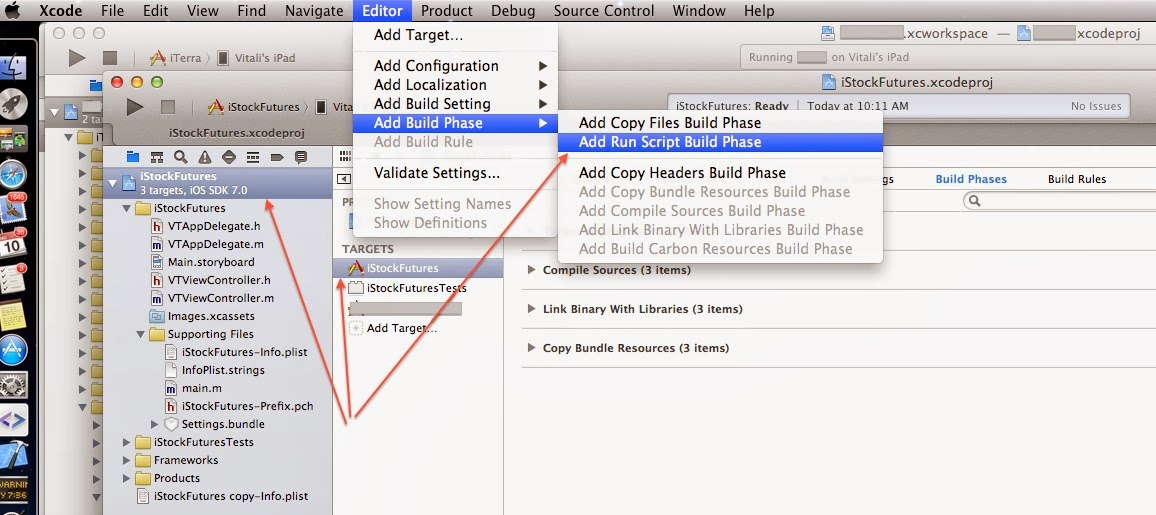
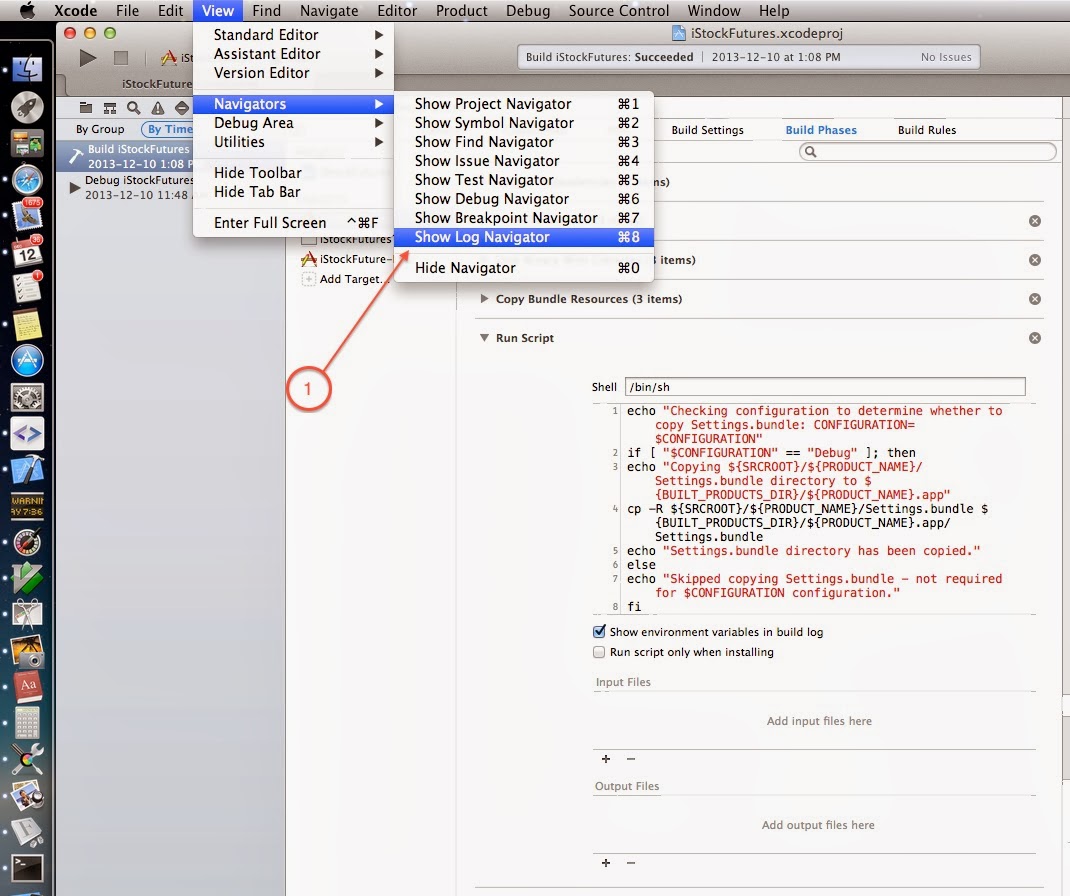
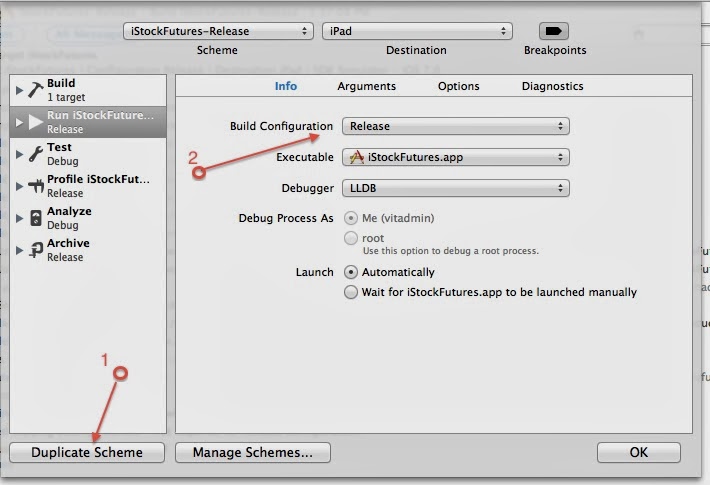
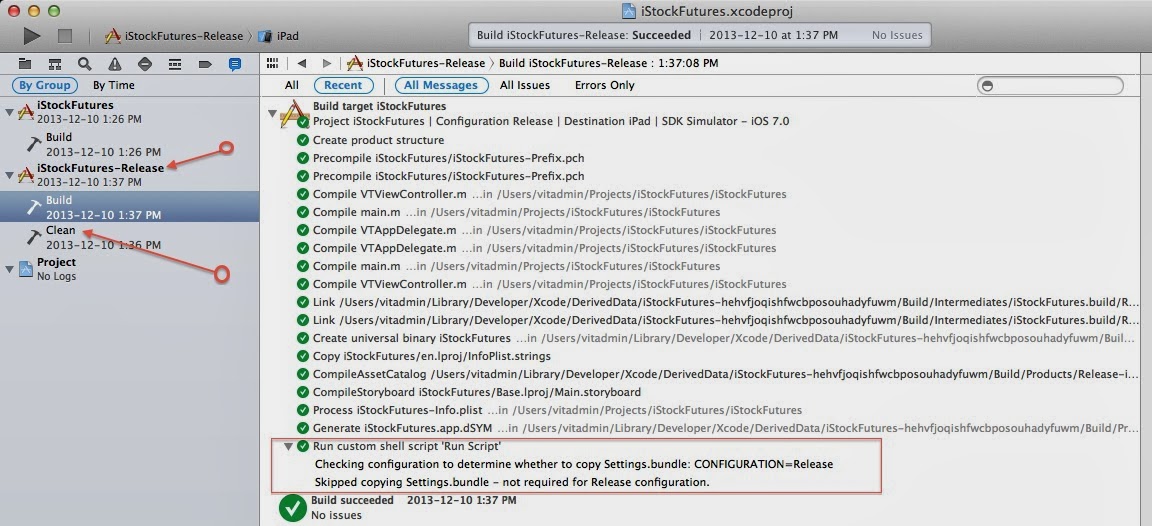
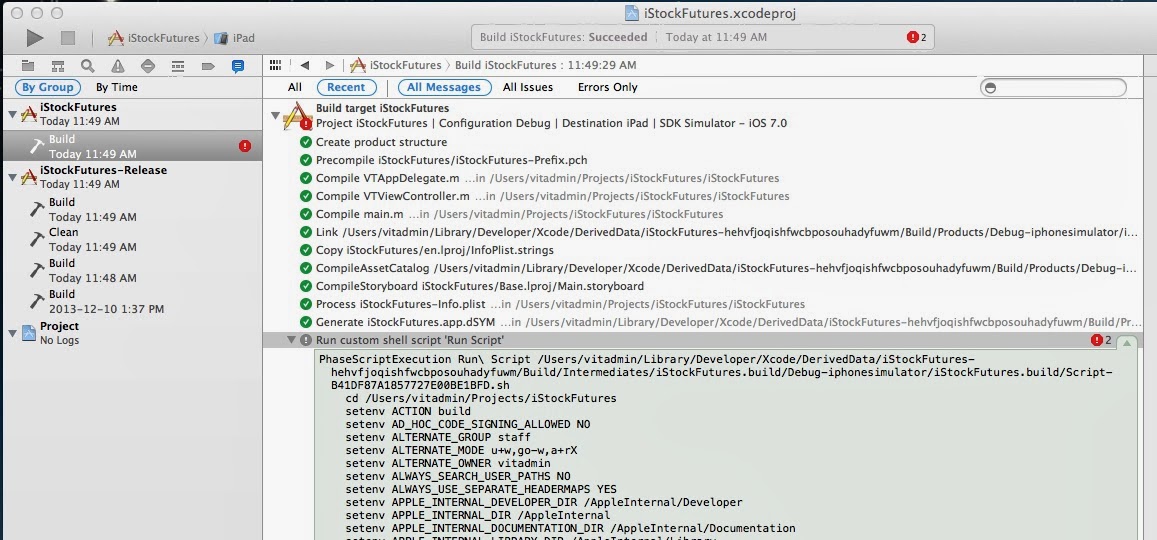
(There are at least 2 ways to do that - either edit the list under Copy Bundle Resources or select Settings.bundle in Project Navigator and uncheck all targets in the File Inspector's Target Membership [View > Utilities > Show File Inspector]).